Start from the reports you want
Most setups go wrong by listing everything a crew might write down. Start at the other end: what will someone count, sort, filter or send to a client at the end of the week? Work back from that to the fields.
What each kind of field lets you do in a report
Section titled “What each kind of field lets you do in a report”Reports and filters read answers from fields, not from how a point looks.
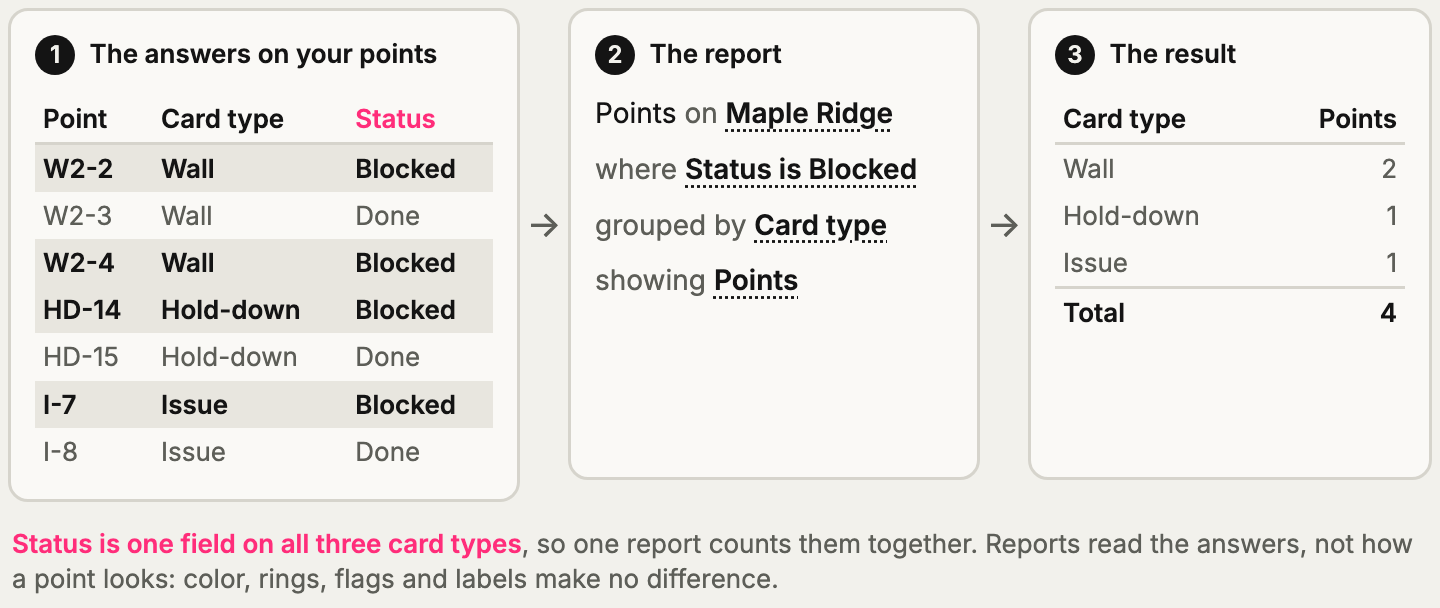
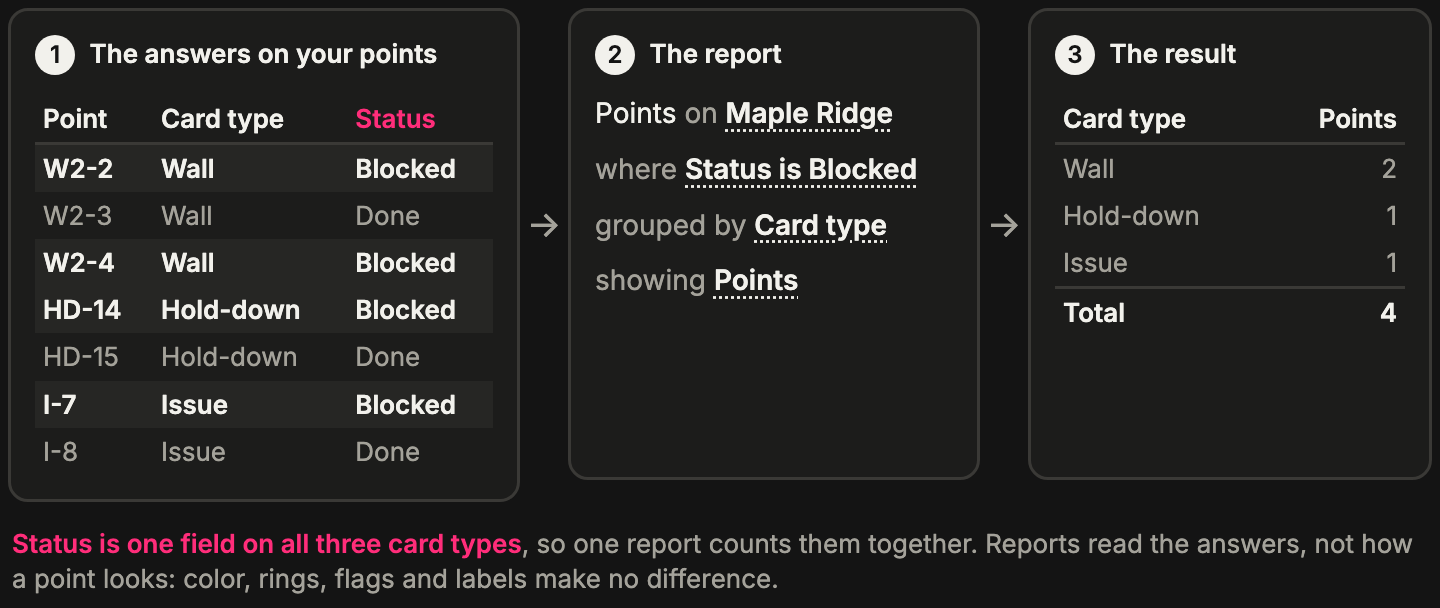
What you can do depends on the field type.
| You want to… | Use | Why |
|---|---|---|
| Count points by a fixed list (Blocked, Done) | Status or Dropdown | Everyone picks from the same words, so the counts add up |
| Filter by words people add as they work | Tags | Anyone can add a tag, and a point can have several. Reports can filter on a tag or show it as a column, but can’t group by Tags |
| Add up an amount in each row | Number or Currency | A number adds up in each row |
| Count points by month, or find late ones | Date | Can group by day, week, month, quarter or year (not a Time-only field) |
| Pick out the points with something on | Flag | A yes or no, and the filter’s Flagged only and Highlighted only |
| Count work done, or its weight | Tasks | Reports can count tasks, tasks done and task weight |
| Search for words | Text | It can be searched, but free words don’t count up well |
Reports also know things you don’t need a field for: Card type, Layer, Page, Project, Placed by and Point created. Don’t make a field for what Pointmap already records.
The test for each field
Section titled “The test for each field”For each thing you might ask, say which report or filter would use it:
- It would be a group, a column or a filter: make it a field, with a field type that can do that job.
- Only someone reading the one card needs it: a note or a photo will do. It doesn’t need a field of its own.
- Nobody can name a use: leave it out for now. You can add a field later. Answers nobody gave can’t be filled in later, so add the ones you know you’ll need before the crew starts.
Each extra question slows down the person standing in front of the wall. Required slows them down most, so use it only where a blank answer would spoil a report.
Why free text spoils counts
Section titled “Why free text spoils counts”If people type “blocked”, “Blocked” and “on hold” into a Text field, a report counts them as three different things. If you’ll want the count, give them a list to pick from.
The same goes for Select and Tags. A one-pick Select’s list is set by owners and admins and doesn’t grow on site, so counts stay clean. Tags are for words nobody could list ahead of time, and you can merge the doubles later. If you want a count for each word, use a one-pick Select: reports can’t group by Tags or by a Select with Multi-select on.
One field, one column
Section titled “One field, one column”A report groups by a field, not by a name. Two separate fields never share a column, even when they mean the same thing. If Wall and Door each have their own status field, no single report column counts status across both. That’s the main reason to reuse a field.
Once your fields are in place, you don’t have to build every report by hand to get an answer: ask Claude, ChatGPT or Grok Bot.
Questions to ask first
Section titled “Questions to ask first”Answer these before making anything, whether you’re setting up on your own or helping someone:
- What kinds of things do you mark on a drawing? These become card types.
- What does the office or the client ask for at the end of the week? These become reports.
- For each report: what does it count, and what does it group by? These become fields.
- What changes as the work moves along? It may need to show on the point.
- What does someone in the field need to see from across the sheet, without opening a card?
- What must be filled in every time, with no exceptions?
- Which things repeat with the same answers, like a product or a detail? These become templates.
- Who shouldn’t see or change something? This can decide where it goes: see Make a new field or reuse one.